01
Want AI, but can't upload originals
Cloud AI is powerful — but client names and ID numbers in case files may breach confidentiality obligations.

LawRedact
Fully offline. Built for privacy.
Legal, finance, trade, healthcare, HR & government docs — redact, review & export on-device. Share and use AI with confidence.
Challenges
These problems can be solved locally, reliably, on your device
When sharing, uploading, or redacting by hand, these risks are easy to overlook — and often surface first.
Cloud AI is powerful — but client names and ID numbers in case files may breach confidentiality obligations.
500-page contracts via Ctrl+F until midnight; different formats need different workflows; assistants miss items.
A missed ID or bank account in an outbound file is a compliance incident — and hard to prove you tried.
Most online tools handle plain Word only — real materials are scanned PDFs, embedded images, tables, barcodes & stamps.
Courts, partner firms, AI tools, public release — each needs a different redaction level and method.
Audits and compliance reviews require proof that redaction was reviewed and recorded.
Use Cases
Six everyday redaction needs in legal work
Pseudonymize locally before drafting — sensitive data never leaves your device.
AI efficiency without breaching confidentiality
One-click redaction and audit reports before sending to partners or regulators.
On-time delivery, lower leak risk
Pseudonymize first — context preserved, real identities hidden.
Cross-border compliance, unified standards
OCR plus table, barcode and stamp masking for screenshots and records.
Real scanned materials redacted reliably
Many files per matter, often hundreds of pages each — folder batch import with fast on-device processing and per-file records.
Big files and big batches, still on deadline
Names and IDs in hearing or interview transcripts — detect and redact locally by policy.
Audio/video materials safe to share or archive
Who It's For
Legal · Finance · Trade · Healthcare · HR · IP · Government · Bidding & finance docs
Judgments, pleadings, case files, contracts, letters and evidence — party, case-number and contact fields redacted on-device after review before sharing or AI use.
Statements, card and account numbers, credit files and audit workpapers need tight control before outbound use. Fully local — no cloud upload — for internal audit, regulatory and third-party review.
Contracts, invoices, packing lists, bills of lading and correspondence often mix languages and jurisdictions. Quad-language detection and on-device redaction unify standards before translation or export.
Physicals, records and lab reports carry names, IDs, contacts and visit numbers. Redact and review locally before sharing, archiving or AI-assisted interpretation.
Personnel files, CVs, compensation records and internal notices — high volume, many identifiers. Excel column and folder batch redaction with templates for internal control and audit trails.
Patent, trademark and copyright filings include application numbers, registrations and party details. Redact locally before agency collaboration, publication drafts or AI drafting.
Official letters, approval packs and docs on secure terminals often cannot reach the public internet. Offline detection and human review for agencies and air-gapped environments.
Tenders, expense claims, payroll sheets and travel receipts — scattered sensitive fields across formats. Per-type redaction policies and pre-export review reduce leakage on submission or AI input.
Proof Points
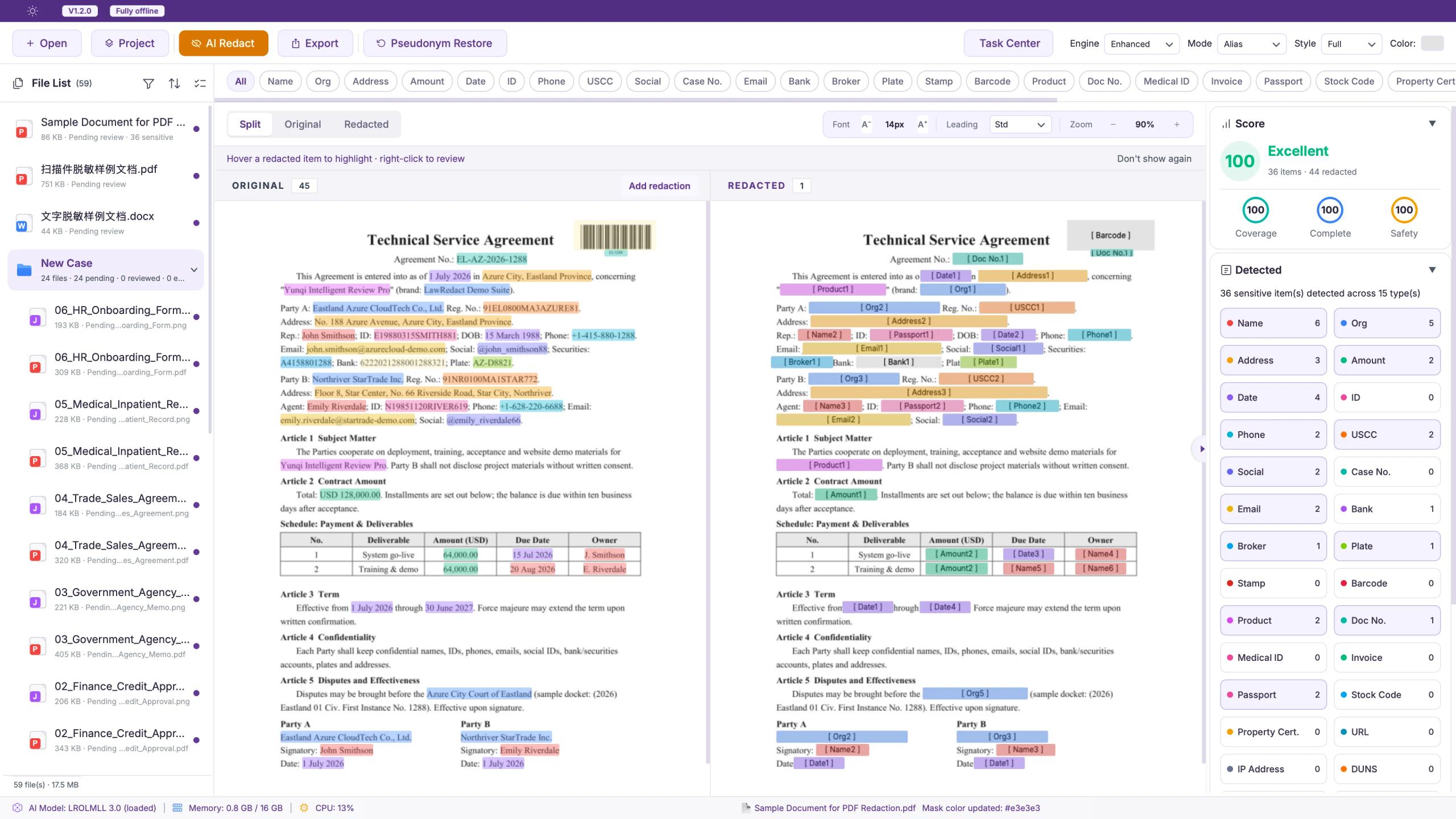
Offline engine, four-language compare, mask modes, human review, and full format support — the essentials for legal redaction
Trained on million-scale legal data. Detect and redact entirely on your device.

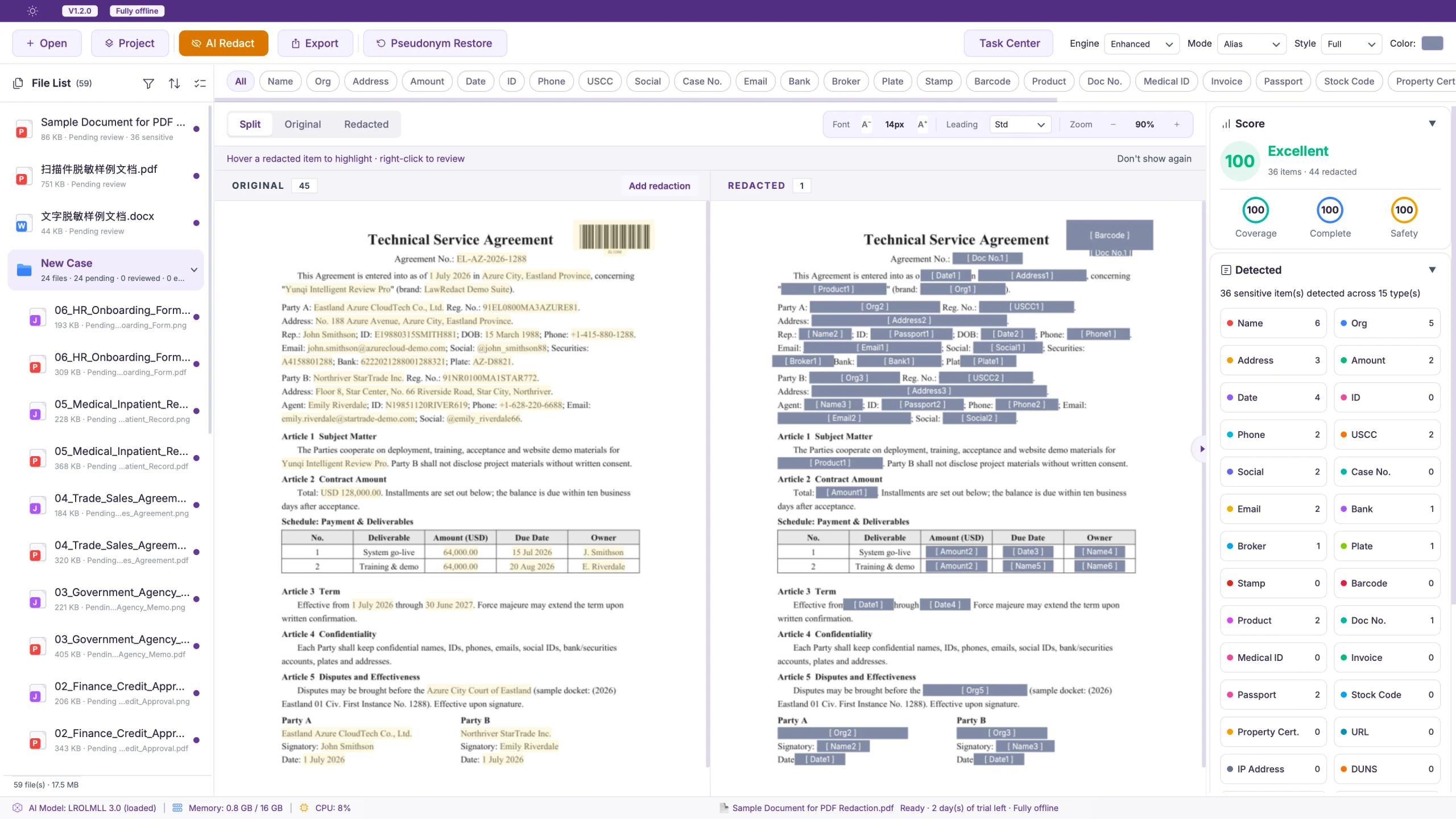
Chinese, English, Japanese and Korean share the same detect-and-redact pipeline. Switch languages to compare highlights vs. output; mixed documents auto-segment.
4 languages
Detection
Sensitive entities highlighted
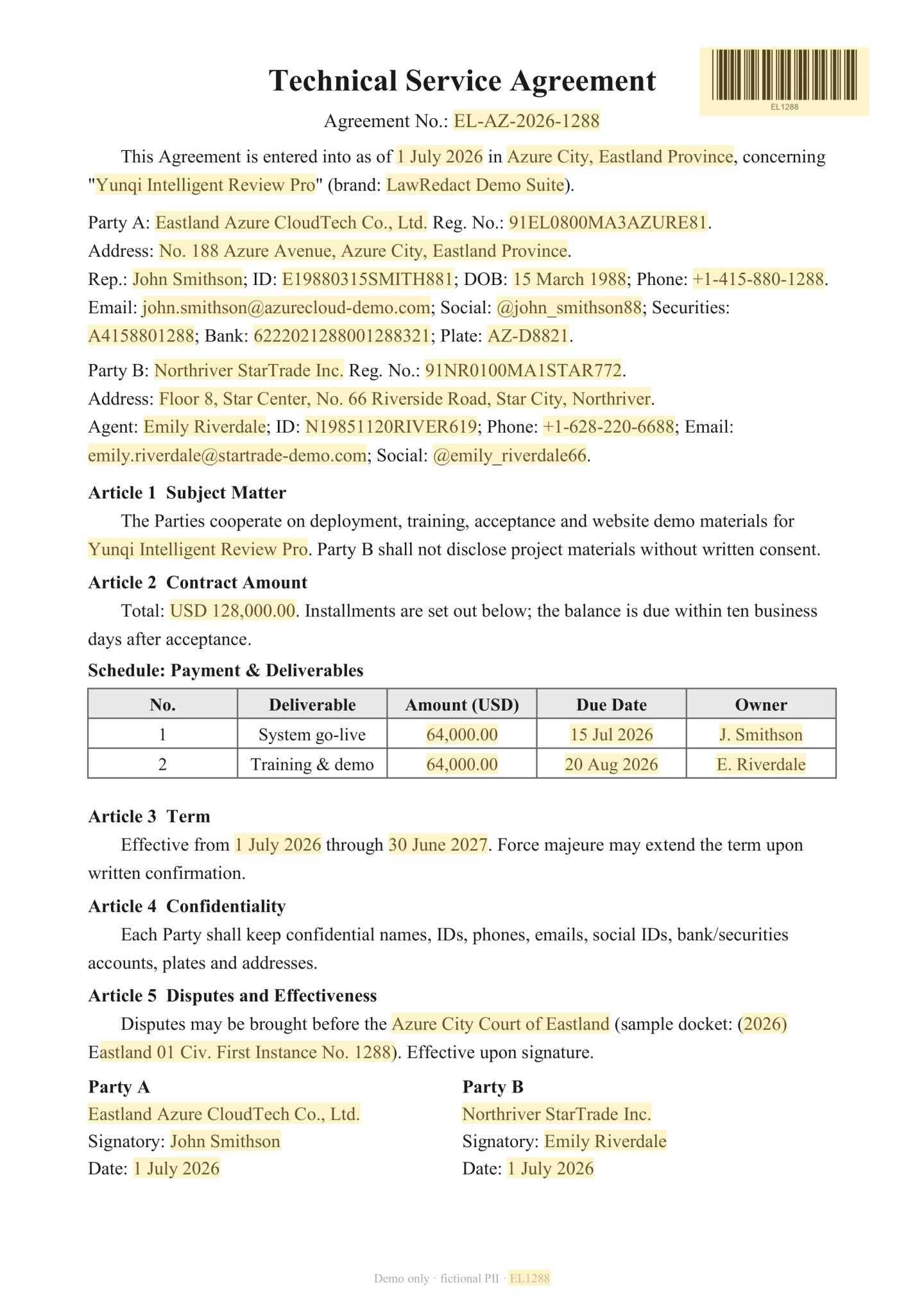
After redaction
Ready for safe outbound use
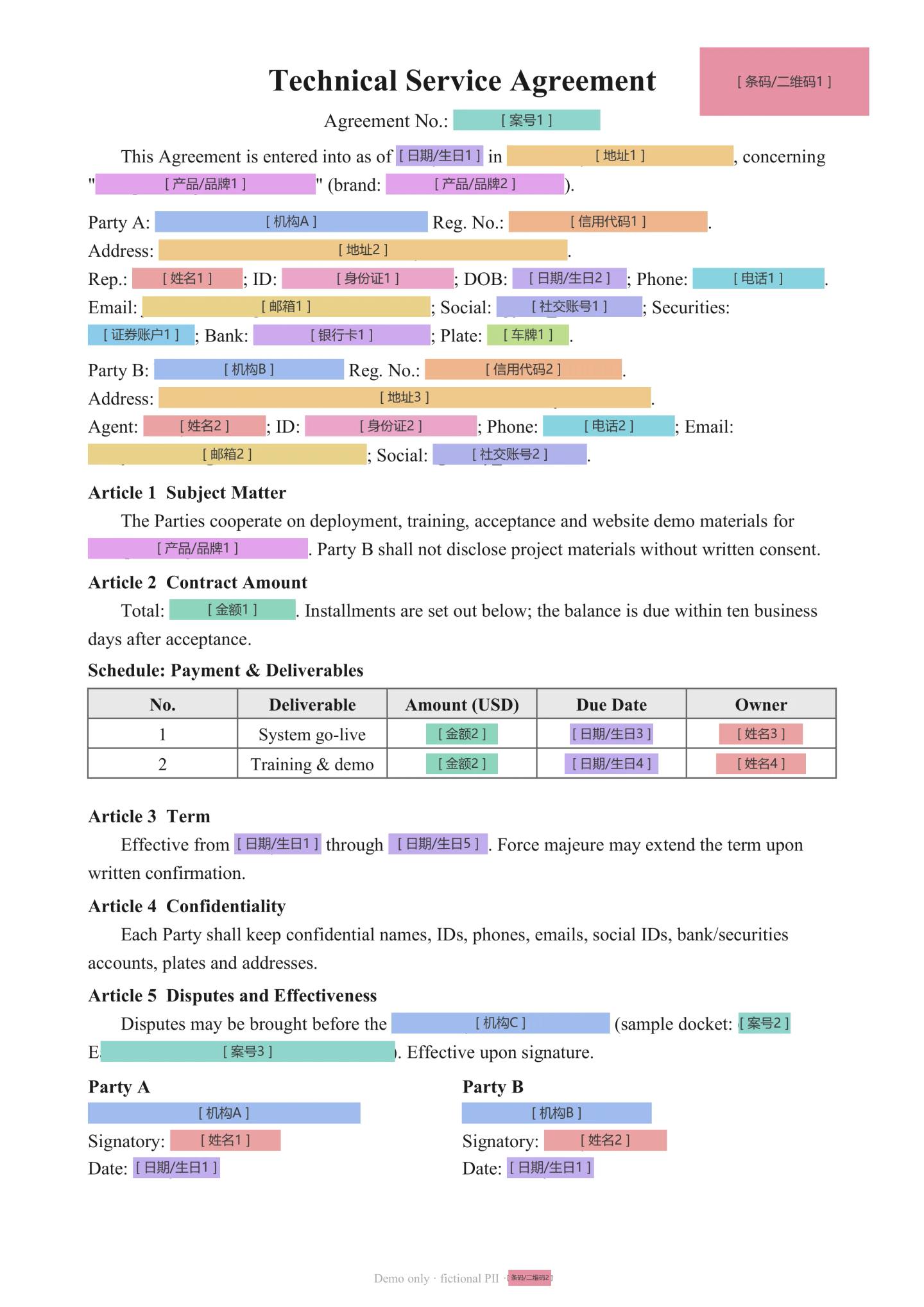
Choose pseudonym, asterisk, color mask, or strict delete — switch output without re-detecting.
4 output modes
Government agency memo sample — detection highlights plus pseudonym, asterisk, and color-mask outputs on real document layouts.
6 industry scenarios
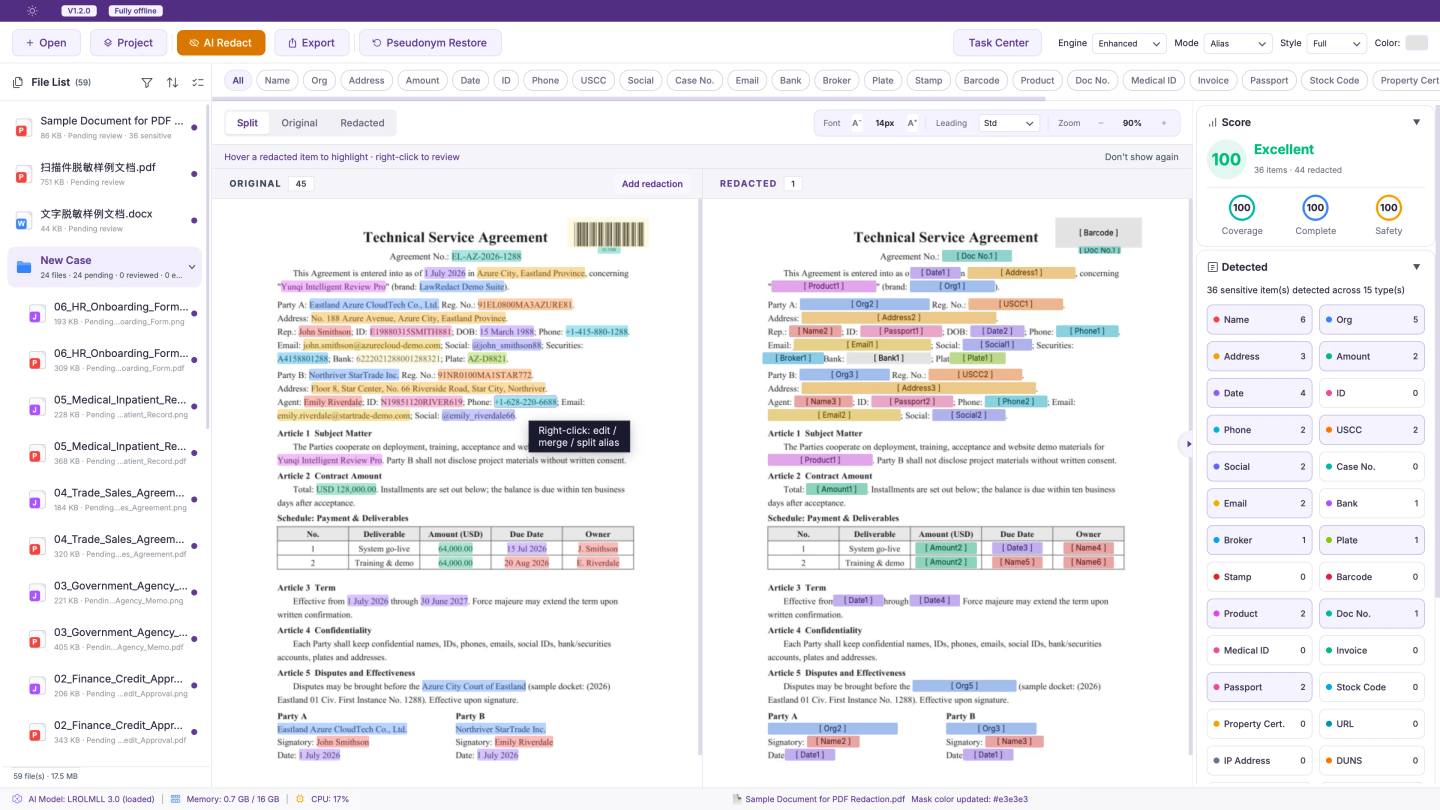
After AI tagging: fix false positives, add misses, correct pseudonyms — with leak warnings and quality scoring before export.
80+ score to export
One-click untag for statutes, product names, and similar noise.
Select or search to add anything the model missed.
Dictionary flags duplicate aliases — unify to one pseudonym per party.
Low-confidence and short numeric strings listed for confirmation.
Common PII covered — configurable per type.
45 types covered
Documents, spreadsheets, images and A/V on-device; case batch; Markdown export.
Import
Parsed on-device
Export
Safe outbound formats
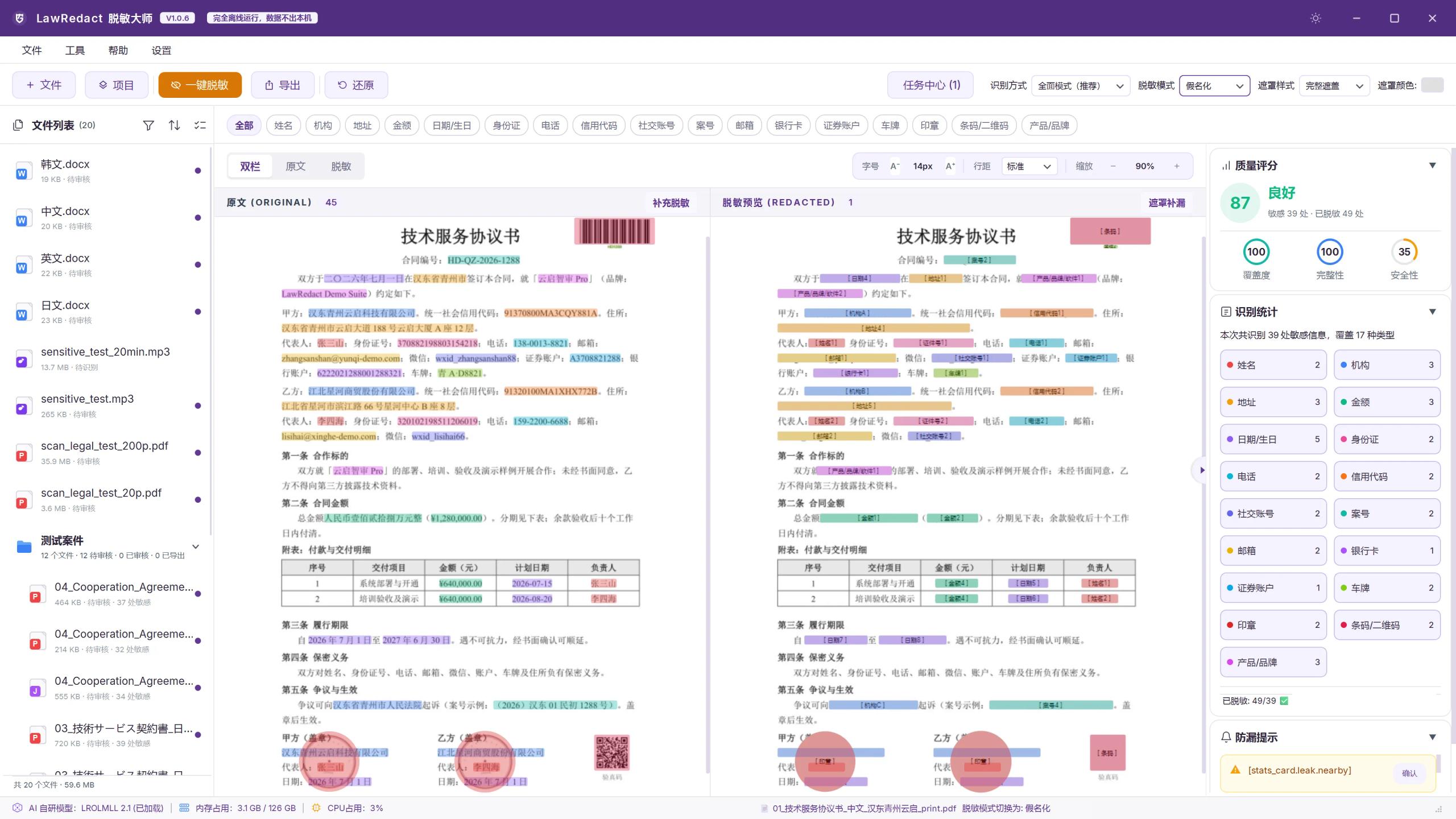
Product demo
Import, detection, human review, and export — a concise walkthrough of the desktop workflow, fully on-device.
Social Proof
Feedback from law firms, in-house teams and compliance orgs
Law Firm · Litigation Team
80 pages · 15 min
Redact locally, then safely use AI for drafting — efficiency without breaching confidentiality.
In-house Legal
30 contracts · batch
Finance Review template for one-click redaction; JSON compliance reports for internal archive.
Arbitration · Case Admin
Folder · per-file archive
Batch import, per-file redaction and archived JSON reports for audit review.
Fully offline — we redact locally before any AI analysis, without breaching confidentiality.
Batch redaction and quality scoring cut our pre-send review time dramatically.
One app detects ZH/EN/JA/KO — our cross-border team finally shares one standard.
Folder batch import and JSON reports make our audit trails simple and reliable.
Materials never leave our intranet — it fits our rules for classified data.
Scanned images and evidence mask reliably; handling vouchers is far less painful.
Fully offline — we redact locally before any AI analysis, without breaching confidentiality.
Batch redaction and quality scoring cut our pre-send review time dramatically.
One app detects ZH/EN/JA/KO — our cross-border team finally shares one standard.
Folder batch import and JSON reports make our audit trails simple and reliable.
Materials never leave our intranet — it fits our rules for classified data.
Scanned images and evidence mask reliably; handling vouchers is far less painful.
Fully offline — we redact locally before any AI analysis, without breaching confidentiality.
Batch redaction and quality scoring cut our pre-send review time dramatically.
One app detects ZH/EN/JA/KO — our cross-border team finally shares one standard.
Folder batch import and JSON reports make our audit trails simple and reliable.
Materials never leave our intranet — it fits our rules for classified data.
Scanned images and evidence mask reliably; handling vouchers is far less painful.
Fully offline — we redact locally before any AI analysis, without breaching confidentiality.
Batch redaction and quality scoring cut our pre-send review time dramatically.
One app detects ZH/EN/JA/KO — our cross-border team finally shares one standard.
Folder batch import and JSON reports make our audit trails simple and reliable.
Materials never leave our intranet — it fits our rules for classified data.
Scanned images and evidence mask reliably; handling vouchers is far less painful.
Pricing
One-time · Perpetual · 1 year free updates
The workstation for law firms and legal teams — batch, A/V, and full review workflow.
Desktop full-suite entitlements above.